Companies and employees
Keep each company's employer ID and routing code, and each employee's Person ID, routing code, IBAN and usual pay. Work for several companies from one app.
Windows software for UAE payroll files
SIF File Maker prepares the WPS salary file (.SIF) and PDF salary slips on your own Windows PC, from the employees and figures you enter or import from Excel. It checks the file before you save it, keeps a month-by-month history, and works fully offline: your salary data is never uploaded.
AED 149 one-time · 14-day free trial for one salary month · Version 1.0.0 · Windows 10/11 (64-bit)
This app prepares a salary file from the figures you enter. It is not approved by, connected to or endorsed by any bank, the Central Bank of the UAE or MOHRE. You and your bank remain responsible for the file, for what it pays and for meeting WPS rules. Check the file before you submit it.
What it does
For small UAE companies, accountants and PRO offices that prepare their own WPS salary files every month. You enter or import the figures; the app checks them, shows the exact file and writes it.
Keep each company's employer ID and routing code, and each employee's Person ID, routing code, IBAN and usual pay. Work for several companies from one app.
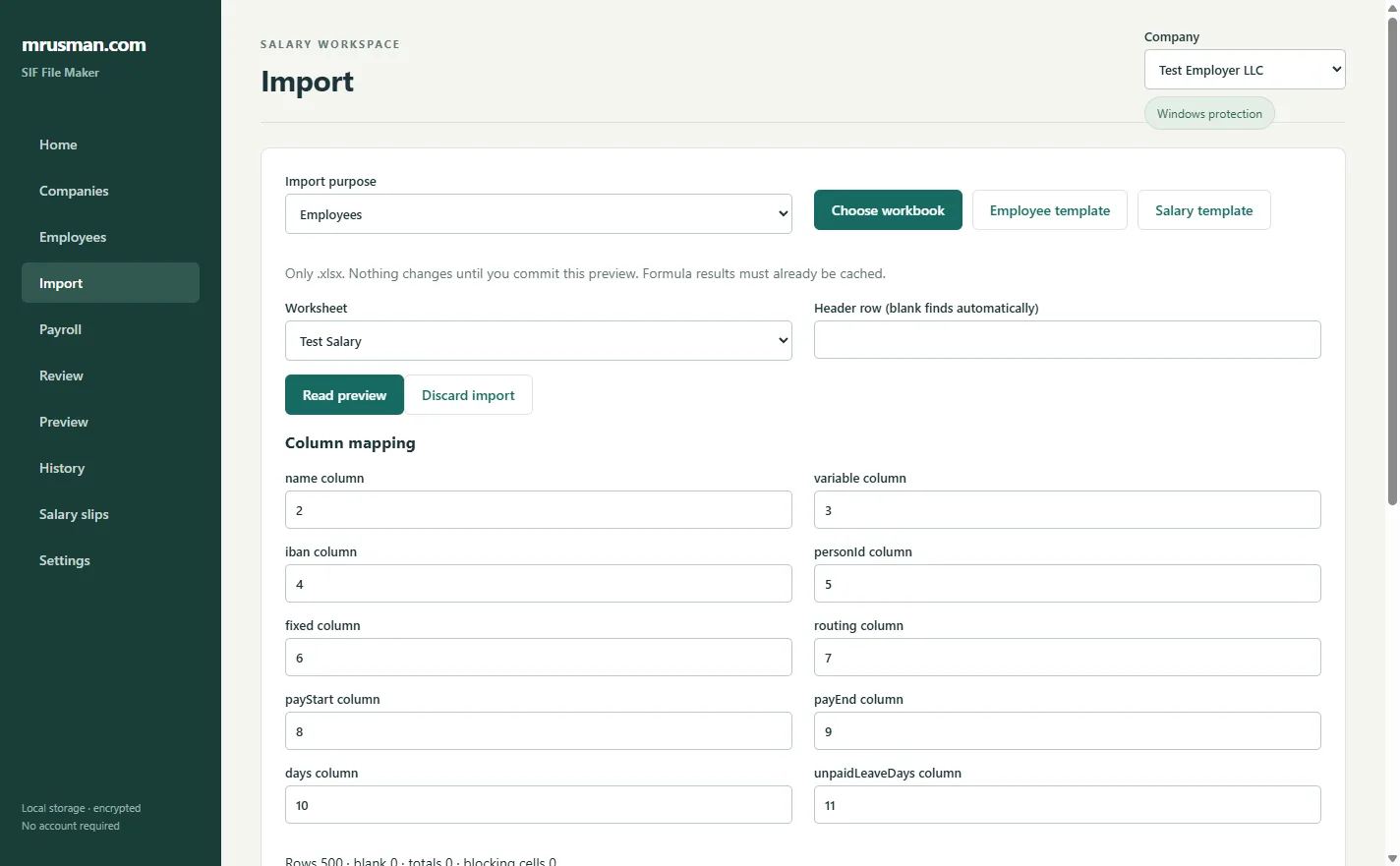
Import an .xlsx salary sheet or use the supplied templates. You see a preview with notes on hidden rows, formulas and rounded amounts, and nothing changes until you commit it.
Person IDs, routing codes, IBAN check digits, dates, days in the month and totals are checked. Problems link to the field. A blocking problem stops the file; there is no override.
The preview shows the exact lines that will be written, with record counts, totals and a SHA-256 fingerprint. The saved file is read back and compared before it counts as done.
One PDF slip per employee from the same run, with names in Latin or Arabic script. IDs and accounts show their last four characters only.
Every file you made, with its fingerprint and the bank result you record. The app warns you before you save the same month again, because uploading a file twice can pay salaries twice.
How it works
Type them in or import an Excel sheet. You enter the figures; the app does not calculate salaries.
Start the month from active employees or last month, enter fixed and variable pay, and resolve every check.
Check the exact preview, save the file to a folder you choose, upload it through your bank as usual, and export the slips.
Inside the app
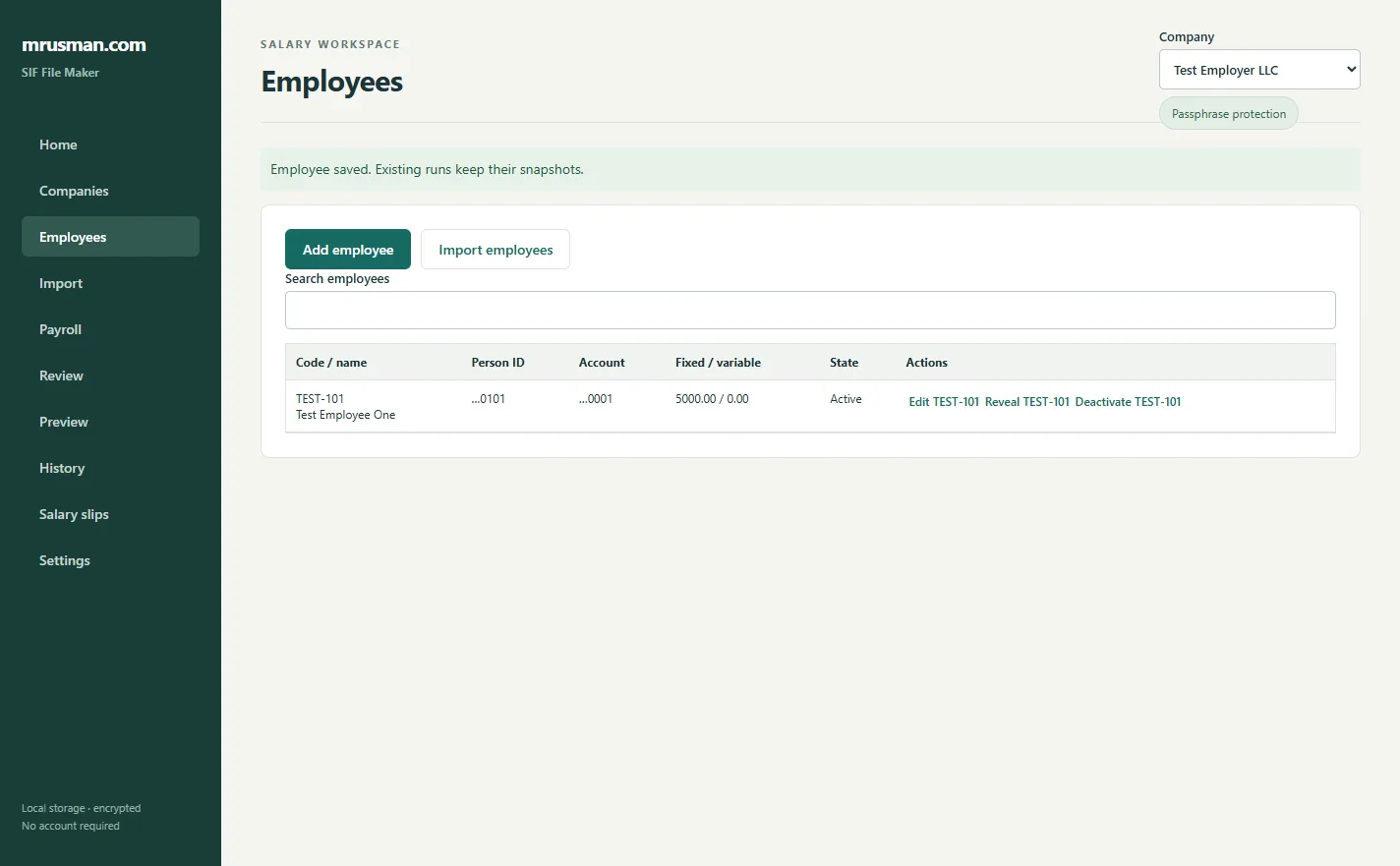
Screenshots from the app with fake test data.
Bank file profile
Version 1.0 includes one bank file profile, for Emirates Islamic. Its file format is based on the bank's published guide; it has not yet been confirmed with a file a bank accepted. Check with your bank before relying on it.
If your company pays salaries through another bank or an exchange house, ask them whether they take this file layout before you rely on it. The free trial lets you make one real month's file and check it with your bank before you pay.
In the app, the profile always shows its source and status, and before a file is written you confirm that you will check with your bank before relying on it.
Privacy
Honest limits
Pricing
Try everything free for 14 days on one real salary month. If the file works for you and your bank, buy a one-time licence you keep. Nothing is ever charged automatically.
One-time licence
AED 149 one-time · about US$41
Update renewal (optional)
AED 49 per year · about US$13
Pay by bank transfer or PayPal. Or email offers@mrusman.com. Refund terms are on the licence terms page. SIF File Maker, ListingReady, Real Estate Reel Maker and Private PDF Toolkit are licensed separately.
14 days with every feature, for one salary month. Make one real month's file and check it with your bank.
In the app open Settings, press Copy machine code under Licence and trial, and send the code to us on WhatsApp or through the contact page.
We send the payment details. Nothing is charged automatically and no card details are stored.
We confirm your payment and send a licence key for your PC. Paste it into Licence key in Settings and press Apply licence.
Free trial download
14 days, every feature, one salary month, no sign-up. Windows 10 or 11, 64-bit.
Version 1.0.0 · released 2026-11-23. The installer is not code-signed, so your browser or Windows may warn you. That is expected; the install steps below show what to click.
SHA-256 checksum of the installer:
06ce683d31efdda9494239e4390898d6d750cc85375586815898535346580b8fIn PowerShell: Get-FileHash .\SIF-File-Maker-Setup-1.0.0.exe -Algorithm SHA256. The result must match exactly.
| File | Size | SHA-256 |
|---|---|---|
| Portable ZIP (no installer) | 153.3 MB | e7adca0c585c9b3118415c759b69b86b1726c25410990372562836ab4a603909 |
| Electron's FFmpeg source (ffmpeg.dll, LGPL) | 26.3 MB | 0b583355d51474b7cff8d40905e3c2a34f58c67720bac98e501cee62c86d75f1 |
The portable ZIP runs from any folder you can write to, without installing, and uses the same data folder as the installed app. The source archive is the corresponding source for the FFmpeg library that Electron ships as ffmpeg.dll, offered under the LGPL; you do not need it to use the app.
Requirements
| Operating system | Windows 10 or 11, 64-bit. Tested on Windows 11. |
|---|---|
| Disk space | About 420 MB for the installed app, plus your data and the files you save. |
| Excel | Not needed. Import reads .xlsx files directly. |
| Internet | Not required to use the app. |
| Install | Installs for your own Windows user. Administrator rights are not required. A portable ZIP is also available. |
Installing
The installer is not code-signed, so Windows may warn you the first time. Here is exactly what you will see and what to do. Your browser may also say the file is not commonly downloaded: choose Keep.
Download the installer and, if you can, compare its SHA-256 checksum with the one on this page.
Double-click the installer. If Windows shows a blue Windows protected your PC window, click More info, then Run anyway. This appears because the installer is not code-signed.
Accept the licence terms and choose the install folder (the default is fine). Administrator rights are not required.
Open SIF File Maker from the Start menu. On the first start it shows how your salary data is protected; if Windows protection is not available, it asks you to set a passphrase. On some PCs the very first start takes longer while security software scans the new program.
To activate: open Settings, press Copy machine code under Licence and trial, send the code to us, then paste the key we send back into Licence key and press Apply licence.
Licence terms, refunds and support are on the licence terms page.
Questions
A SIF (Salary Information File) is the file a UAE employer gives its bank or exchange house to pay salaries under the Wage Protection System (WPS). It has one line per employee and one line with the employer's totals.
Small UAE companies, and accountants or PRO offices, that prepare their own WPS salary files from an Excel sheet every month and want to check the file before it goes to the bank.
AED 149 (about US$41), paid once, including 1 year of updates. After that year the version you have keeps working; an optional update renewal is AED 49 (about US$13) per year. A licence covers 1 PC plus 1 backup PC. The 14-day trial is free.
Version 1.0 includes one bank file profile, for Emirates Islamic. Its file format is based on the bank's published guide; it has not yet been confirmed with a file a bank accepted. Check with your bank before relying on it. If your company pays salaries through another bank or an exchange house, ask them whether they take this file layout before you rely on it. The free trial lets you make one real month's file and check it with your bank before you pay.
No. It is not connected to or endorsed by any bank, the Central Bank of the UAE or MOHRE. You and your bank remain responsible for the file, for what it pays and for meeting WPS rules. Check every file before you upload it. A file the app accepts may still be rejected by your bank or by the Wage Protection System.
No. You enter the fixed and variable pay for each employee, or import them from Excel. The app checks the figures and makes the file and slips from them. It calculates no allowances, deductions, end-of-service benefits, gratuity or tax.
No. It saves the file to a folder you choose. You upload it through your bank's own portal or channel, as you do now, and can record the result in the app's history.
Only on your PC, encrypted. The app never connects to the internet, and we never see your data. The SIF files and slips you save are ordinary, unencrypted files, so choose where you keep them.
The trial lasts 14 days, with every feature, and covers one salary month: the first month for which you write a SIF file or keep a salary slip becomes the trial month, and you can make that month's file and slips again as often as you need. Other months need a licence key. After the trial you can still open, edit, check, back up and restore your salary data; writing salary files and exporting slips needs a key.
Yes. You can keep several companies in one app, each with its own employees and monthly runs, including clients whose payroll you handle.
No. Each app has its own licence key. If you already use one of them, your machine code is the same, so we can issue several keys from one message.
Yes. Send us the new machine code and we will issue a replacement key at no charge. Move your data with an encrypted backup from Settings and restore it on the new PC. There is no automatic transfer because the app does not phone home.
The installer is not code-signed, and Windows warns about any new unsigned installer. Also, on some PCs the very first start after installing can take longer while security software scans the new program. Check the SHA-256 checksum we publish for the installer to confirm it is the genuine file, then choose More info and Run anyway if you are comfortable.
Please use the free 14-day trial first; it exists so you can check a real month's file with your bank before paying. Once a key has been issued, a licence is not refundable. The exceptions are being charged twice, not receiving a working key, or us being unable to get the app to install or activate on a supported PC after reasonable help. The full terms are on the licence terms page.
What's new
Start the free 14-day trial, make one real month's file and check it with your bank. If it works for you, a licence is AED 149 once.