Daily trend filter
Reads the daily trend from EMA 50 against EMA 200 of the previous completed day. Buy marks appear only in an uptrend and sell marks only in a downtrend.
Charting tools for gold traders
Gold Trend Breakout is a charting indicator for XAUUSD on the H4 chart. It reads the daily trend, marks a breakout when an H4 candle closes beyond the previous 100 candles, and draws the entry, a stop at 2 x ATR and a target at 1:2. You get the TradingView version (Pine Script) and the cTrader version (indicator file and C# source).
US$17 per month, or US$179 per year · Educational charting tool, not financial advice.
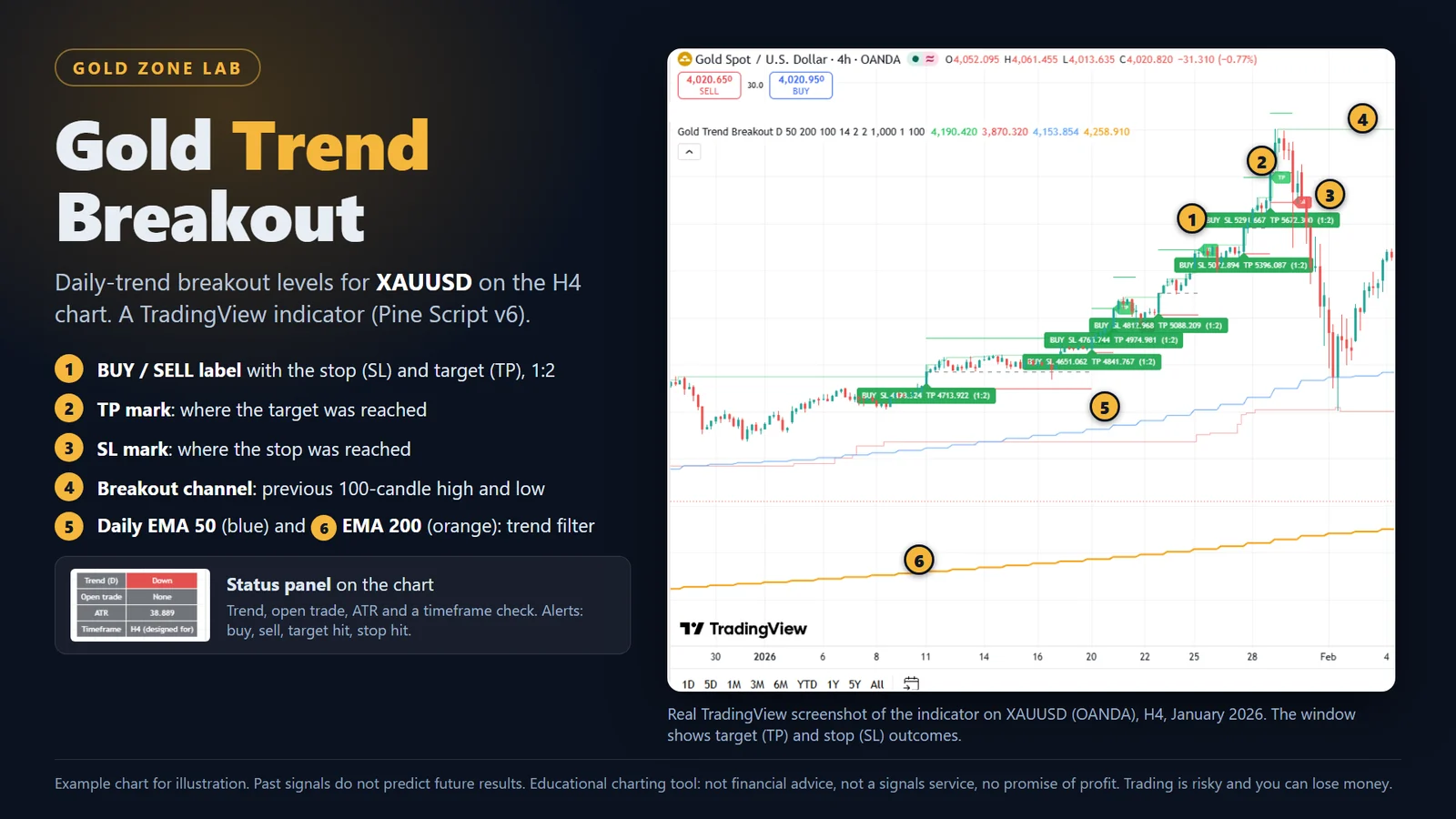
What it does
Gold Trend Breakout turns one simple trend-following rule into marks and levels you can see. It does not predict anything. It shows where the rule says a breakout closed, and where its stop and target sit.
Reads the daily trend from EMA 50 against EMA 200 of the previous completed day. Buy marks appear only in an uptrend and sell marks only in a downtrend.
A mark appears when an H4 candle closes above the highest high, or below the lowest low, of the previous 100 candles. It is decided on the closed candle and is not changed afterwards.
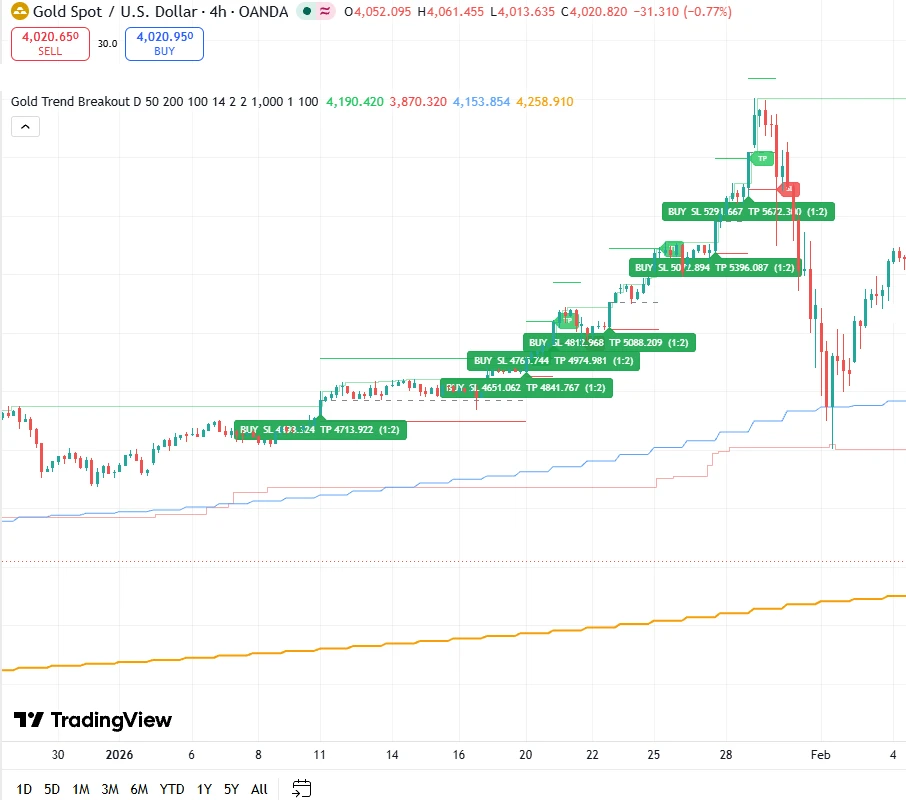
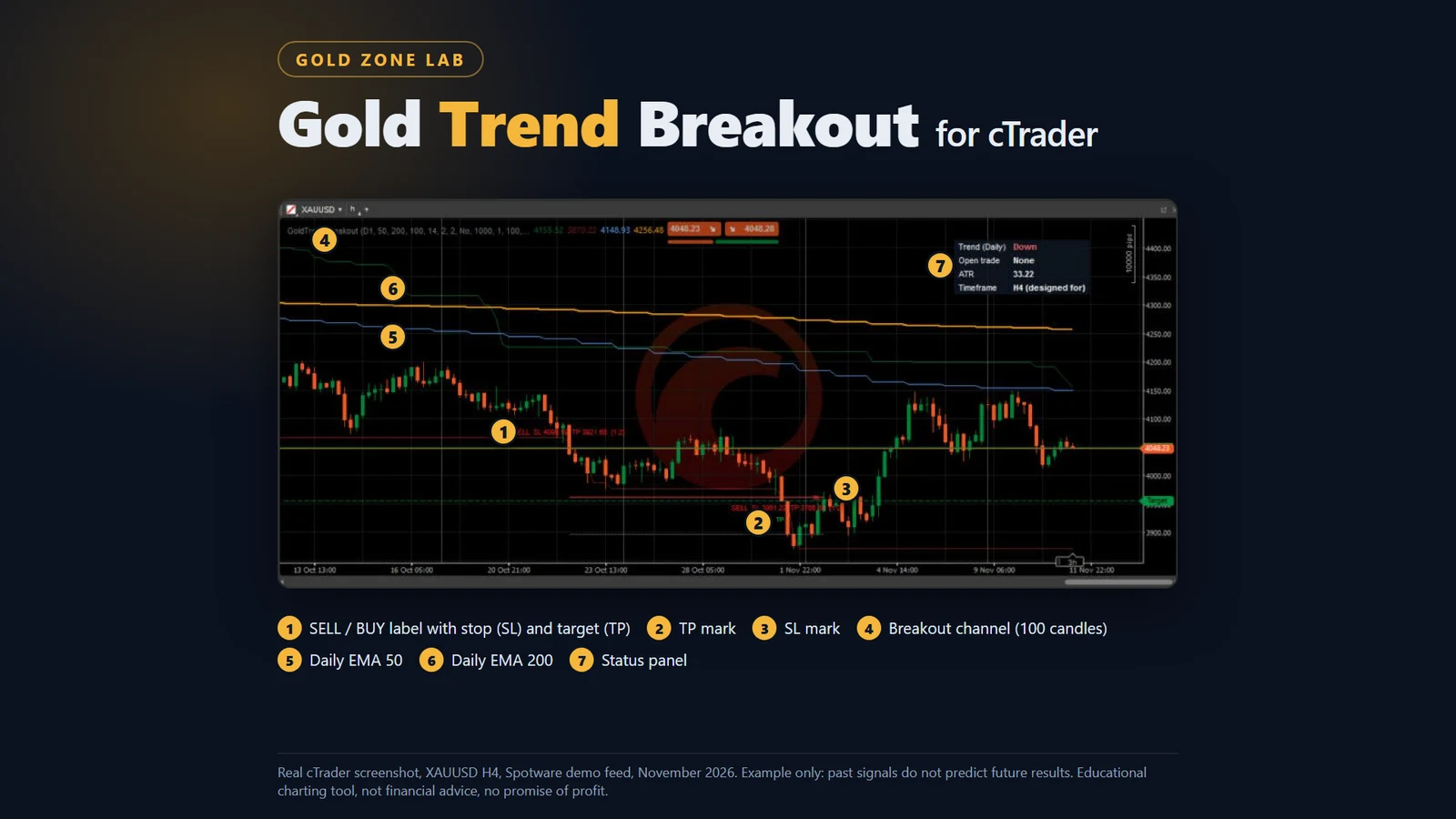
Each mark shows the stop (2 x ATR by default), the target (1:2 reward to risk by default), and lines for entry, stop and target. The stop, target and look-back are settings you can change.
The indicator tracks one trade at a time and marks where the stop (SL) or target (TP) was reached, so you can review the chart honestly, losses included.
A small panel shows the daily trend, whether a trade is open, the current ATR, and a warning if the chart is not on H4.
Alerts for a new buy or sell mark, target reached and stop reached. An optional label can show a position size from your balance and a risk percentage, capped at 1%.
How it works
Paste the Pine script into TradingView, or install the indicator file in cTrader. A free TradingView account is enough.
The rules are built for gold on the 4-hour chart. The panel warns you on any other timeframe.
Marks show where a breakout closed and where the stop and target sit. You decide whether to trade; the indicator never places trades.
On the chart
What you get
Honest limits
Plans
Both plans include the TradingView and cTrader versions and updates while the plan is active. Nothing renews or charges by itself.
Monthly
US$17 per month · about AED 62
Yearly
US$179 per year · about AED 657
The licence allows personal use on your own accounts. No resale and no sharing. Refunds: if the files will not load and we cannot fix it, you can ask within 7 days of purchase.
Choose a plan and send a WhatsApp message with the button on this page.
Pay by PayPal or bank transfer. Nothing is charged automatically.
After payment is confirmed you receive the download link and the install guides.
For the monthly plan, send the next payment before the month ends to keep updates. Nothing renews by itself.
Requirements
| Platform | TradingView (Pine Script v6; a free account works within its limit on indicators per chart) or cTrader. |
|---|---|
| Market and timeframe | XAUUSD, 4-hour (H4) chart. |
| Trend data | The daily trend lines need enough daily history loaded on the chart. |
| Delivery | After your payment is confirmed you receive a download link for the bundle by WhatsApp or email. |
Questions
Signals are decided on closed candles and are not changed afterwards. A mark appears when the next candle opens, so you never see a mark that later disappears.
It is built and checked for XAUUSD on the H4 chart. Other markets and timeframes are not tested.
No. It is an educational charting tool. It draws levels from a fixed rule and promises no profit. Trading is risky and you can lose money.
No. You paste the script into your own TradingView account. A free account is enough, within its limit on indicators per chart.
A bundle with the TradingView Pine script, the cTrader indicator file and C# source code, install guides and the licence terms.
Yes. They are settings in the indicator.
Message us. If the files will not load on TradingView or cTrader and we cannot fix it, you can ask for a refund within 7 days of purchase.
Gold Trend Breakout is an educational charting tool. It is not financial advice, not a signals service and it makes no promise of profit. Trading is risky and you can lose money.
Pick a plan and message us on WhatsApp. US$17 per month or US$179 per year.